


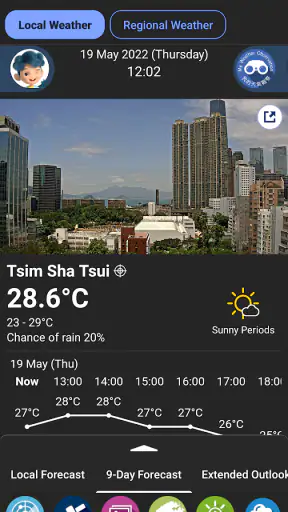
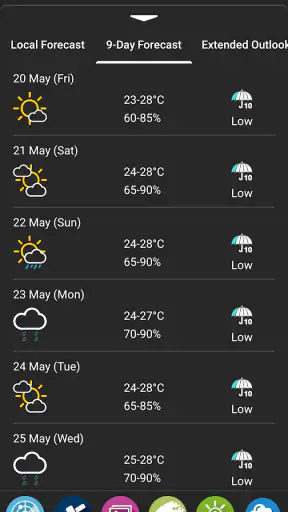
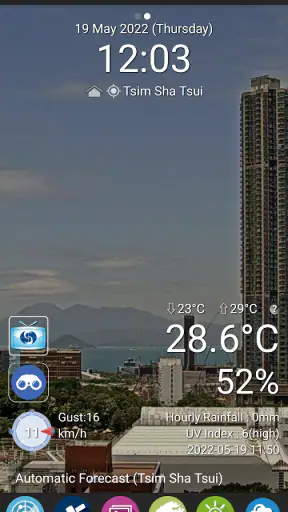
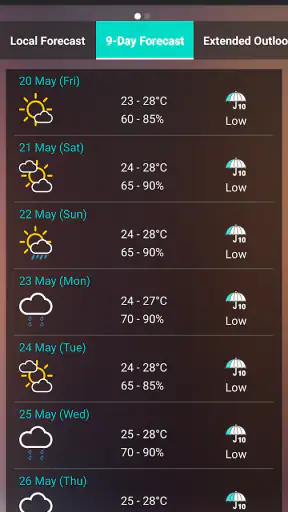
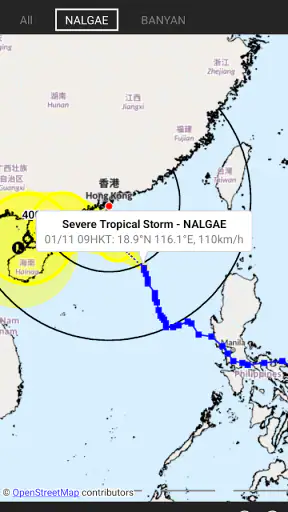
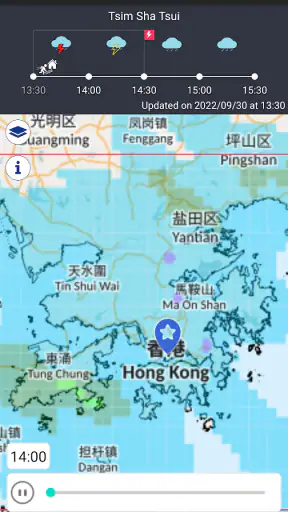
I started using MyObservatory as the sort of app I could check before leaving home, but it quickly made more sense as a shared household reference point. When several people need to decide whether to walk, cycle, commute, take children outside, or change an evening plan in Hong Kong, a weather warning can be more useful than a long forecast discussion. The app is built by the Hong Kong Observatory, and its focus is clear: local weather information and warning notifications rather than a broad, worldwide weather experience.
That local focus is the reason I would recommend it to many Hong Kong residents. It is free, rated for Everyone, and available for Android devices running version 6.0 or later. The app has been around since late 2010, so it feels like an established public-service tool rather than a short-lived experiment. Its current version is 5.20, and its presence on the platform is substantial, with over five million installs. The average rating sits at 3.9 from around thirty-six thousand ratings, which suggests a useful but not universally smooth experience.
How MyObservatory works in a shared household
A realistic use case is a family preparing for a school day. One person checks the outlook before leaving for work, another wants to know whether an umbrella is sensible, and a teenager is deciding whether outdoor plans are worth keeping. Instead of everyone searching different weather pages, the household can use the same official source and discuss the same warning situation. That shared reference is one of the app’s strongest practical qualities.
I would not treat it as a family-management tool, because it is not presented that way. There is no reason to assume that it creates child profiles, manages accounts, or coordinates household members automatically. Its value comes from information that people can consult and share themselves. That distinction matters: the app can support a family decision, but it does not replace a family calendar, messaging group, or parental-control system.
The most useful routine is simple. Before commuting, I would check current conditions and any active warnings. Before arranging an outdoor activity, I would look again closer to the departure time instead of relying on an earlier glance. For a household, this reduces the common problem of one person forwarding an old screenshot while everyone else assumes it is current. Weather changes, and a live check is more dependable than memory.
Notifications are particularly relevant when several people use the same information differently. A warning may affect a commuter immediately, while someone staying indoors may only need to know whether a later appointment should move. MyObservatory can put official warnings into the normal decision process, but each person still needs to interpret the message for their own plans. I appreciate that it keeps the warning function central rather than burying it under lifestyle content.
What I would check before installing it on a shared device
On a shared tablet or family phone, I would first decide who is actually responsible for reading notifications. Weather alerts can become background noise if every person assumes someone else has seen them. A better arrangement is to agree that one adult checks the app during severe conditions and tells the rest of the household what action is needed. The app supplies the information; the household supplies the communication.
I would also avoid treating a single forecast view as a guarantee. A weather service is helpful for planning, but it cannot remove uncertainty from short showers, changing wind, or rapidly developing conditions. If a child is going on an outdoor trip, I would combine the app’s warning information with the school or organizer’s instructions. The official weather source is valuable, but it should not be used as an excuse to ignore a responsible adult’s decision.
Another practical boundary is device ownership. If one person installs it on a phone used by several family members, notification preferences should be chosen with everyone in mind. A commuter may welcome frequent alerts, while another user may find them distracting. I would discuss that before switching everything on, especially on a device used by a child for schoolwork. The question is not whether notifications are useful; it is whether the selected device is the right place for them.
For individual phones, separate usage is easier. Each person can open the app when needed and make their own choices about attention and timing. That is more comfortable for adults with different schedules. It also avoids confusion when one household member wants a quick glance while another is trying to use the device for something unrelated.
Coordinating plans without overcomplicating the weather check
My preferred household workflow would be a two-stage check. First, someone looks at the app while plans are being discussed. Second, the person who is actually travelling checks again shortly before leaving. This is more sensible than repeatedly refreshing the forecast all day, and it recognizes that the person outdoors has a different need from the person staying home.
This approach is useful for shared errands. Suppose one family member is collecting another from a transit stop. The driver can check warnings before leaving, while the person waiting can decide whether to bring rain protection or move to a safer sheltered location. Neither person needs a detailed weather lecture. They need a current, local reference and a clear conversation about timing.
The same idea works for older relatives who may prefer straightforward information. I would not assume that everyone wants to explore every screen. Showing them where warnings and current conditions appear, then agreeing on what matters to them, is more helpful than expecting them to learn the entire app. In that sense, the app works best when one confident user helps another establish a small, repeatable routine.
There is also a useful trade-off between official detail and convenience. General weather apps often try to cover many cities and present polished summaries designed for quick scanning. MyObservatory is more focused on Hong Kong’s own weather service. That can feel less universal, but it is an advantage when the household’s main concern is local warnings rather than comparing destinations around the world.
If someone regularly travels outside Hong Kong, I would pair this app with another service that covers the places they visit. I would not expect a locally focused observatory app to replace an international travel-weather tool. For residents whose daily life is centered in Hong Kong, however, the narrower scope is exactly what makes it relevant.
Age, trust, and the right way to involve children
The Everyone age rating makes the app suitable in a broad age context, but suitability is not the same as supervision. A child can look at weather information, yet a child should not be expected to decide alone whether a warning makes an activity safe. I would use the app to teach practical awareness—checking conditions, noticing warnings, and asking an adult when plans may need to change—rather than handing over responsibility for risk decisions.
This is where the app’s public-service character helps. The Hong Kong Observatory is a more reassuring source for local warnings than an anonymous page copied through social media. Still, trust should not mean blind acceptance. I would encourage children to read the actual notice and tell an adult what they found, instead of forwarding a dramatic message without context.
For teenagers, the app can support more independence. A student commuting alone can check conditions before leaving and make a sensible preparation choice. Parents can discuss a simple rule: warnings matter more than convenience, and uncertainty is a reason to communicate rather than take a chance. MyObservatory can support that conversation without turning it into surveillance.
I would be careful with shared accounts and shared devices. The app should not be described as offering family profiles or separate child boundaries unless those functions are clearly available in the installed experience. In a household, the boundary is mainly social: adults decide how information is used, children learn how to consult it, and everyone understands that a weather app is not an emergency plan by itself.
That last point is important for trust. A notification is not the same as a personal instruction. A warning may cover a broad situation, while the household’s location, transport method, and activity create specific concerns. I find the app most responsible when it starts a conversation: “There is a warning; should we delay, change route, or stay inside?” It is less responsible when someone treats an alert as a complete answer without considering the actual plan.
Where it feels stronger than ordinary weather alternatives
The clearest strength is local authority. Many general weather apps are convenient, attractive, and useful for comparing several locations, but their Hong Kong information may be one part of a much larger global system. MyObservatory is designed around Hong Kong weather service needs, so it is the app I would reach for when the main question is whether local warnings could affect the day.
It also has a different relationship with notifications. In a typical commercial weather app, alerts can sit beside advertising, lifestyle recommendations, travel features, or a large selection of unrelated places. Here, the warning purpose is much easier to understand. That does not automatically make every screen better, but it gives the app a clear job and makes it easier to explain to another household member.
The downside is that a focused public-service app may not satisfy people who want a highly personalized weather dashboard. If you expect extensive customization, a global map, detailed travel planning, or an especially polished visual forecast, another weather app may feel more comfortable. I would choose MyObservatory for local relevance first, not for entertainment or decorative presentation.
Another limitation is that official information can still require interpretation. A warning notification tells me that attention is needed, but I may still need to read the wording and relate it to my route or activity. Someone looking for a single color-coded answer to “Can I go outside?” may find that frustrating. In my experience, that slight friction is preferable to false certainty, but it means the app rewards careful reading.
Small habits that make the app more useful
My first tip is to check the app at decision points, not continuously. Morning departure, an outdoor appointment, and the return journey are more meaningful moments than constant refreshing. This keeps the app useful without allowing weather checking to take over a shared device.
My second tip is to make warnings part of a household phrase everyone understands. For example, the person who checks the app can say what the warning means for the plan, not merely announce that a warning exists. “Let’s postpone the park visit” is more useful than sending a notification with no explanation. The app becomes a coordination aid rather than another stream of information.
My third tip is to show less confident users the same basic path every time. On a family tablet, I would leave the app in a familiar place and teach one routine: open it, look for current conditions, check warnings, then ask if the plan needs changing. A consistent workflow is more valuable than trying to explain every available weather detail.
My fourth tip is to use a second source only when the situation calls for it. For a Hong Kong household routine, MyObservatory should be the first check. For an overseas trip, a destination-specific service may be better. For transport disruption, the relevant transit operator remains necessary. Matching the source to the decision prevents one app from being expected to solve every problem.
These habits also expose the app’s main trade-off. It is strongest when users want dependable local weather information and are willing to make a judgment. It is weaker for people who want the app to make the judgment for them. That is not a flaw unique to this product, but it is especially important in a household where different ages and levels of confidence share the same information.
Who should use it and who may want something else
I think MyObservatory is a good fit for Hong Kong residents, commuters, families arranging outdoor plans, and anyone who wants local warning notifications from the Hong Kong Observatory. It is also sensible for a shared household device because the purpose is easy to explain and the information can support several different daily routines.
I would be more cautious about recommending it as the only weather app for frequent international travelers. A person who needs one app for several countries may prefer a broader service. Likewise, someone who values elaborate visualizations, extensive personalization, or a highly customized dashboard may be happier elsewhere.
People who dislike notifications should also think about how they will use it. The warning function is central to the app’s purpose, but alerts are only useful when they are noticed and understood. If a user routinely dismisses every notification, the installation adds little value. In that case, a deliberate manual-check routine may be better than expecting background alerts to do the work.
The app is free, which removes the usual price barrier for trying it. I would still judge it by relevance rather than by cost. Free does not make a locally focused service useful to someone whose weather needs are mostly abroad, and it does not make it a substitute for emergency guidance or household communication.
My household verdict
After using it as a practical local weather reference, I see MyObservatory as a dependable companion for everyday Hong Kong planning, especially when more than one person needs to coordinate around changing conditions. Its best quality is not that it tries to do everything. It stays close to the Hong Kong Observatory’s weather-service role, and that makes warnings easier to take seriously.
I would install it on an adult’s phone or a shared household tablet, agree on who checks alerts, and teach younger users to consult it with an adult rather than make safety decisions alone. That setup respects age differences without inventing family controls the app is not meant to provide. It also keeps account and device boundaries clear: the app informs the household, while people remain responsible for communication and choices.
My final recommendation is positive, with one condition: use it as an official local reference, not as an all-purpose global weather dashboard. For a Hong Kong family deciding whether to leave, delay, change an outdoor plan, or prepare for a warning, it earns a place on the device. The most reliable benefit comes from combining its alerts with a simple household routine and sensible human judgment.


